

Busmark 1.0 · coming to iPhone and iPad
Fault current to conduit fill. One offline toolbox.
Busmark is a calculation app for electrical engineers and designers. Run a Quick Calc for a single answer, or build a one-line project that cascades fault current, voltage drop and conduit fill from the source to every panel. No account, no internet connection, and every result shows its working.
Coming soon to the App Store
Want to hear the day it ships? Email [email protected].
See what it calculates

- Quick Calcs, live as you type
- 5
- Checks cascaded through every project
- 3
- Network requests the app makes
- 0
- Accounts, ads or subscriptions
- 0
01Quick Calcs
One answer, the moment the inputs make sense.
Five calculators with live results. There is no Calculate button: change a value and the answer, its Pass or Fail check and its warnings update at once.
Fault Current
Available fault current at the source, the transformer secondary and the end of a feeder, by the point-to-point method. Infinite bus, utility amps or MVA, or a generator; optional motor contribution.
1φ and 3φ · transformers · busway
Voltage Drop
Solve for the drop, the minimum conductor size, or the maximum length. AC with power factor or DC, copper or aluminum, parallel sets, and an ampacity check at 60, 75 or 90 °C.
drop · min size · max length
Conduit Fill
Fill percent for any mix of conductors, or the smallest conduit that fits. Grounding conductors counted, nipples at 60 %, jam ratio and remaining capacity shown.
fill % · size to fit · jam ratio
Max Conductors
How many identical conductors fit in a given conduit type and trade size.
per conduit
Protection Sizing
A vendor-neutral guide to overcurrent device and conductor ampacity for feeders and branches, motor branches, and transformer primaries.
feeder · motor · transformer
Answer first.
The result you came for sits at the top, with a Pass, Fail or Not checked badge in words as well as color. Intermediate values are one tap away in Calculation Steps, and Copy Results puts the inputs, results and method on the clipboard as plain text.
- Imperial or metric, switchable at any time
- Favorites and the last 100 calculations saved automatically
- Add any Quick Calc to a project in one step


02Projects
From the source to every panel.
Build a radial system once. Every edit recalculates the whole tree: fault current at every node, voltage drop on every feeder, conduit fill in every raceway.

- Start from a utility source or a generator
- Add transformers, switchboards, panelboards, MCCs, disconnects, motors and loads
- Point-to-point, or the impedance method with X/R and asymmetry on 3φ systems
- Cumulative voltage drop from each transformer and from the source
- Warning badges on the exact feeder or panel that needs attention
- Undo and redo, notes on any component, duplicate a whole project
- 01
Build
Add components in the builder or tap the diagram. Feeders carry their conductor, raceway, length and design current.
- 02
Calculate
Results cascade down the tree as you type. Errors block only the result they affect; warnings never hide a number.
- 03
Deliver
Export a PDF report, a fault current label, CSV tables or a Busmark file for a colleague.
03Outputs
Deliverables, not just numbers.
Everything leaves the app as a file you choose to share, through the share sheet, Files or AirDrop.

PDF report
US Letter or A4. Project settings, the one-line diagram, fault current, voltage drop and conduit fill tables, warnings, every formula with its values substituted, notes and reference citations. No daily limits; several projects in one PDF.
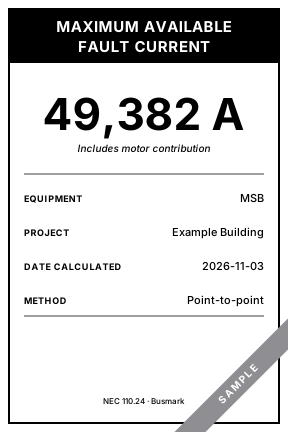
Fault current label
An available fault current marking for NEC 110.24 in an original black-and-white layout: PDF at 4 × 6 in or 3 × 5 in, or a 1200 × 1800 px PNG.
Check label wording against what your authority having jurisdiction expects.
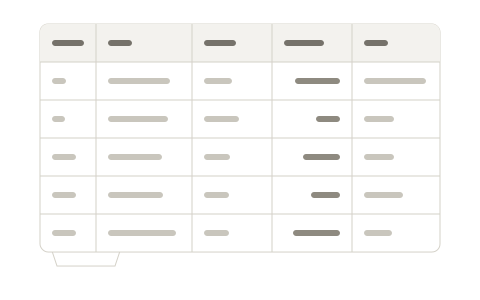
CSV tables
Nodes, feeders and conduit fill as three CSV files with units in the headers, ready for a spreadsheet.
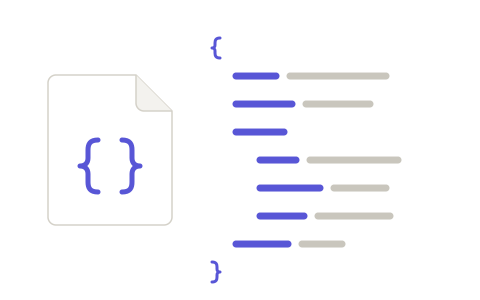
Busmark files
Projects and Quick Calcs travel as
.busmarkfiles. They are plain JSON: rename one to.jsonand open it in any text editor. Import checks every field and recalculates on arrival.
04Show your work
Every result can show its working.
Busmark is built to be checked. Each result links to the formulas, inputs and reference table behind it, and the reference data is yours to review.


Calculation Steps
Every intermediate value with its formula ID, inputs and the table it came from.
Methodology Guide
Plain-language articles on each method, every formula, its assumptions and its limits, searchable inside the app.
Reference Tables
Conductor, raceway, ampacity and fault data with a citation on every table. Review values, correct them for the edition you work to, export them, or reset to the bundled data.
05Privacy
Your projects stay on your device.
Busmark has no account and never connects to the internet. Your work moves only when you share a file.
Works offline
No network access at all. It works the same in a basement switchgear room as at your desk.
No account
Nothing to sign up for and no credentials to hold.
No tracking
No analytics, no advertising, no telemetry, no crash-report uploads.
You choose what leaves
Files go out only through the share sheet, Files or AirDrop, when you send them.
Apple frameworks only
Built entirely on Apple's own frameworks, with no third-party SDKs or code.
Back up as files
Export projects as {P} files and keep them wherever you keep your work.
06iPhone and iPad
In the field on iPhone. At the desk on iPad.
The same projects and calculators, laid out for each screen.


- iPad sidebar, workspace and inspector side by side
- Hardware keyboard shortcuts for undo, redo and new project
- Dark mode, Dynamic Type up to the largest accessibility sizes, and full VoiceOver labels with spoken units
- Requires iOS 17 or iPadOS 17 or later
07FAQ
Questions from the office and the field.
Who is Busmark for?
Electrical engineers, designers and contractors who size feeders, check fault current and fill conduit, and need to show how they got the answer.
Does it replace engineering judgment?
No. Busmark performs calculations with the methods and reference data described in its Methodology Guide. Results are estimates that a qualified person must verify against the adopted code edition and manufacturer data.
Which code edition does it use?
The bundled reference tables cite the 2023 NEC (NFPA 70). You can choose another edition in Settings; where a table for that edition is not included, Busmark uses the nearest earlier edition and tells you so. You can also edit any table to match the edition you work to.
What can a project model?
Radial systems fed by one source, either a utility or a generator, through transformers, switchboards, panelboards and MCCs to motors and loads.
Does it calculate line-to-ground faults?
No. Line-to-ground fault current needs zero-sequence data that Busmark does not collect, and single-phase faults on three-phase systems are not calculated either. The Methodology Guide lists every limitation.
Does it need an internet connection?
Never. Busmark makes no network requests, and there is no account to sign in to.
How do I move projects between devices or share them?
Export a Busmark file and send it with AirDrop, Mail, Messages or Files, then open it on the other device. The file is plain JSON.
What will it cost?
Pricing will be announced when Busmark arrives on the App Store. There are no subscriptions and no in-app purchases.
Is there a Mac version?
Busmark is designed for iPhone and iPad.
Put the toolbox in your pocket.
Busmark is coming soon to the App Store for iPhone and iPad.
Coming soon to the App Store
Email [email protected] to hear the day it ships.